Tutorial by Vinod Kumat

JAX-WS Web Services stub client wsimport


How to generate the stub client for jax-ws web services by wsimport java utility?
It's so simple, we need WSDL file or service publish then we can use it as end point URL in wsimport tool.

For writing the wsdl client we need to generate all the JAXWS artifacts from the wsdl. Generating the artifacts for Client is same as we generate the artifacts in Tutorial Web Services JDK6 wsimport utility Top-Down Approach..
For generating artifacts you can use wsimport utility of JDK

Generate client side Artifacts
Create a Java project and generate the JAXWS artifacts using wsimport.
e.g:
F:\blogs\JAX-WebServices-Top-Down>wsimport -keep -s src -d bin http://localhost:
8888/GreetingWebService?WSDL
parsing WSDL...

generating code...
Where as I've just created the java project with name JAX-WebServices-Top-Down.

Now our stub class is there as GreetingWebServiceImplService.java.

Adding the client code
Right click on the src located under JAX-WebServices-Top-Down. 
New
Class
Enter the name: GreetingWebServiceClint.java
package: com.vinod.tutorialwebservices.clint

package com.vinod.tutorialwebservices.clint;

import com.vinod.tutorialwebservices.GreetingWebService;
import com.vinod.tutorialwebservices.GreetingWebServiceImplService;

public class GreetingWebServiceClint {

/**
         * Vinod Kumar
* @param args
*/
public static void main(String[] args) {
GreetingWebServiceImplService objGreetingWebServiceImplService =
new GreetingWebServiceImplService();
GreetingWebService obj = objGreetingWebServiceImplService
.getGreetingWebServicePort();
System.out.println(obj.sayWelcome("Vinod Kumar"));
}


}

Out Put:

Vinod Kumar

Project dir will look like as mention below:

JAX-WS, Web Services, stub, client,   wsimport, tutorial, example and code.


Final Words:
Thanks! Hopping, generating the client code web services will work for you as well. Like and share if you like my work. Happy learning and implementation!

Tutorial Web Services JDK6 wsimport utility Top-Down Approach


First of all read the previous tutorial, we discussed on Bottom-Up approach (Code first) click me 
Before reading the top down approach.

Let's discussed about web services JDK6 wsimport utility (Top-Down Approach):

Software, Hardware requirement:
Eclips, Java 1.5+, any Windows OS.

Top-down approach is useful when we already have WSDL as a contract. In this approach first user create the JAX-WS artifacts using WSDL for that purpose JDK have wsimport tool. This tool generates some JAXB classes, Client side stub and an endpoint service interface. For creating the endpoint service class we have to implement generated endpoint service interface in our endpoint service class.

Generate JAXWS artificates from WSDL using wsimport command
We can provide a WSDL from local file system or we can also provide the WSDL using End point URL to generate the JAX-WS artifacts using wsimport tool.

Note: assuming our code first is publish and accessible with URL:
http://localhost:8888/GreetingWebService?WSDL


F:\blogs\JAX-WebServices-Top-Down>wsimport -keep -s src -d bin http://localhost:
8888/GreetingWebService?WSDL
parsing WSDL...

generating code...
Where as I've just created the java project with name JAX-WebServices-Top-Down.

Details about wsimport tools:

F:\blogs\JAX-WebServices-Top-Down>wsimport
Missing WSDL_URI

Usage: wsimport [options] <WSDL_URI>

where [options] include:
  -b <path>                 specify jaxws/jaxb binding files or additional schem as
                            (Each <path> must have its own -b)
  -B<jaxbOption>            Pass this option to JAXB schema compiler
  -catalog <file>           specify catalog file to resolve external entity refe rences
                            supports TR9401, XCatalog, and OASIS XML Catalog for mat.
  -d <directory>            specify where to place generated output files
  -extension                allow vendor extensions - functionality not specifie d
                            by the specification.  Use of extensions may
                            result in applications that are not portable or
                            may not interoperate with other implementations
  -help                     display help
  -httpproxy:<host>:<port>  specify a HTTP proxy server (port defaults to 8080)
  -keep                     keep generated files
  -p <pkg>                  specifies the target package
  -quiet                    suppress wsimport output
  -s <directory>            specify where to place generated source files
  -target <version>         generate code as per the given JAXWS specification version.
                            version 2.0 will generate compliant code for JAXWS 2.0 spec.
  -verbose                  output messages about what the compiler is doing
  -version                  print version information
  -wsdllocation <location>  @WebServiceClient.wsdlLocation value

Examples:
  wsimport stock.wsdl -b stock.xml -b stock.xjb
  wsimport -d generated http://example.org/stock?wsdl


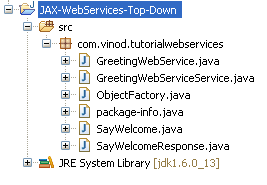
Project structure look like:
example,tutorial, web services, jdk, top down and approach


GreetingWebService.java is service interface.
GreetingWebServiceService.java is used for Stub class for using the client side.

Now add the Service implementation class: right click on the src > new > class.
Enter the name: GreetingWebServiceImpl
package: com.vinod.tutorialwebservices.impl


GreetingWebServiceImpl.java file look like bellow:

package com.vinod.tutorialwebservices.impl;

import javax.jws.WebMethod;
import javax.jws.WebParam;
import javax.jws.WebResult;
import javax.jws.WebService;
import javax.xml.ws.RequestWrapper;
import javax.xml.ws.ResponseWrapper;

import com.vinod.tutorialwebservices.GreetingWebService;

@WebService(name = "GreetingWebService", targetNamespace = "http://www.tutorialwebservices.vinod.com")
public class GreetingWebServiceImpl implements GreetingWebService {

    /**
     *
     * @param sName
     * @return returns java.lang.String
     */
    @WebMethod
    @WebResult(targetNamespace = "")
    @RequestWrapper(localName = "sayWelcome", targetNamespace = "http://www.tutorialwebservices.vinod.com", className = "com.vinod.tutorialwebservices.SayWelcome")
    @ResponseWrapper(localName = "sayWelcomeResponse", targetNamespace = "http://www.tutorialwebservices.vinod.com", className = "com.vinod.tutorialwebservices.SayWelcomeResponse")
    public String sayWelcome(
            @WebParam(name = "sName", targetNamespace = "") String sName) {
        return "" + sName;
    }
}

Expose the service
Right click on the src > new > class.
Name of file: GreetingWebServicePublish
package: com.vinod.tutorialwebservices.pbls

GreetingWebServicePublish.java
package com.vinod.tutorialwebservices.pbls;

import javax.xml.ws.Endpoint;
import com.vinod.tutorialwebservices.impl.GreetingWebServiceImpl;

/**
 * @author Vinod Kumar
 *
 */
public class GreetingWebServicePublish {
    /**
     *
     * @param ar
     */
    public static void main(String ar[]) {
        Endpoint.publish("http://localhost:8888/GreetingWebService",
                new GreetingWebServiceImpl());
    }
}
 
Right click on the GreetingWebServicePublish and run it as java application.

Time to verify service

For verify service open the any browser then enter the http://localhost:8888/GreetingWebService?WSDL

<?xml version="1.0" encoding="UTF-8" standalone="yes"?>
<!-- Generated by JAX-WS RI at http://jax-ws.dev.java.net. RI's version is JAX-WS RI 2.1.1 in JDK 6. -->
<definitions targetNamespace="http://www.tutorialwebservices.vinod.com" name="GreetingWebServiceService" xmlns="http://schemas.xmlsoap.org/wsdl/" xmlns:tns="http://www.tutorialwebservices.vinod.com" xmlns:xsd="http://www.w3.org/2001/XMLSchema" xmlns:soap="http://schemas.xmlsoap.org/wsdl/soap/">
  <types>
    <xsd:schema>
      <xsd:import namespace="http://www.tutorialwebservices.vinod.com" schemaLocation="GreetingWebServiceService_schema1.xsd"/>
    </xsd:schema>
  </types>
  <message name="sayWelcome">
    <part name="parameters" element="tns:sayWelcome"/>
  </message>
  <message name="sayWelcomeResponse">
    <part name="parameters" element="tns:sayWelcomeResponse"/>
  </message>
  <portType name="GreetingWebService">
    <operation name="sayWelcome">
      <input message="tns:sayWelcome"/>
      <output message="tns:sayWelcomeResponse"/>
    </operation>
  </portType>
  <binding name="GreetingWebServicePortBinding" type="tns:GreetingWebService">
    <soap:binding transport="http://schemas.xmlsoap.org/soap/http" style="document"/>
    <operation name="sayWelcome">
      <soap:operation soapAction=""/>
      <input>
        <soap:body use="literal"/>
      </input>
      <output>
        <soap:body use="literal"/>
      </output>
    </operation>
  </binding>
  <service name="GreetingWebServiceService">
    <port name="GreetingWebServicePort" binding="tns:GreetingWebServicePortBinding">
      <soap:address location="REPLACE_WITH_ACTUAL_URL"/>
    </port>
  </service>
</definitions>

 
example,tutorial, web services, jdk, top down and approach


Last Words:
Thanks! Tutorial for web services, jax-rs, top down approach is helpful. Like and share it. Put your input.
Happy learning and implementation.